Polaris Budget · for iPhone, iPad and Mac

Follow your North Star to every budget goal.

Envelopes or tracking, alone or with a partner. Your budget and receipts never leave your devices and your iCloud. Bank linking is optional and read-only.

No copy on Polaris servers · No Polaris account · Bank linking optional

Polaris is the North Star, the one that holds still. Set a target and steer by it.Sample targets

  • Housing: Every month
  • Insurance: Every year
  • Emergency Fund: Build up to
  • Flights: By a date
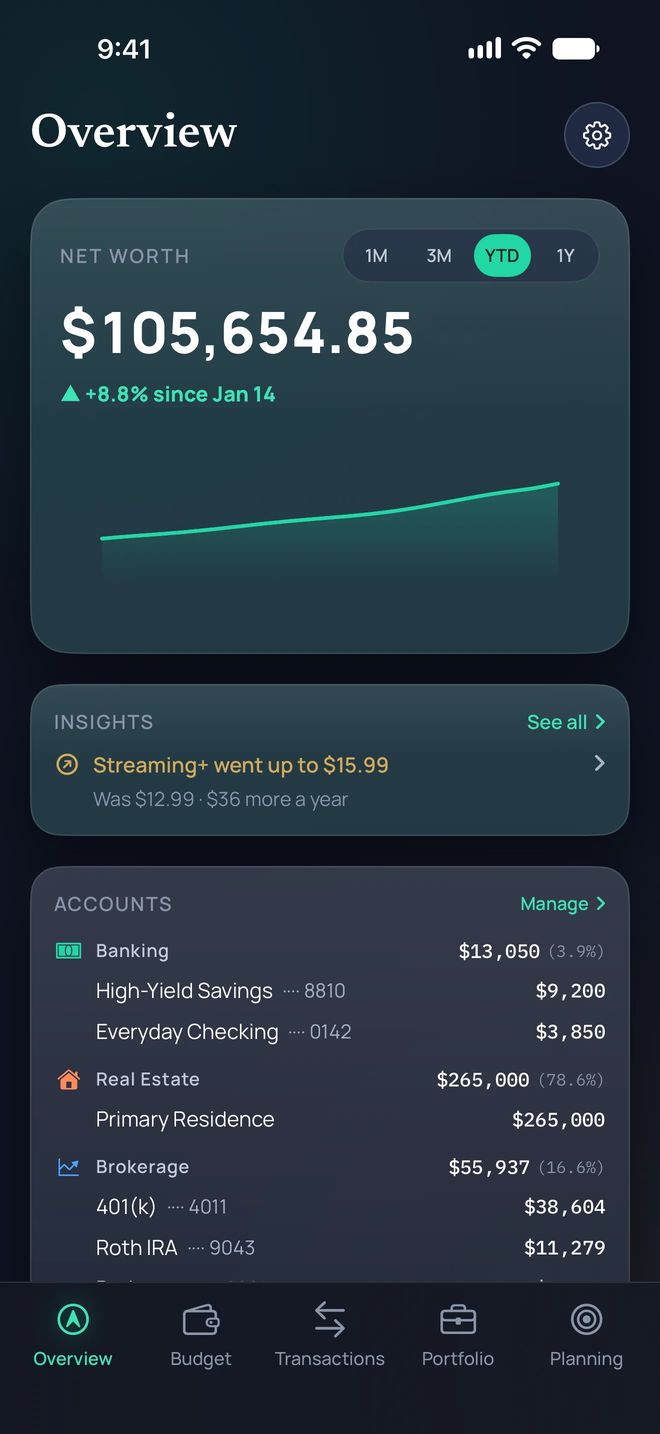
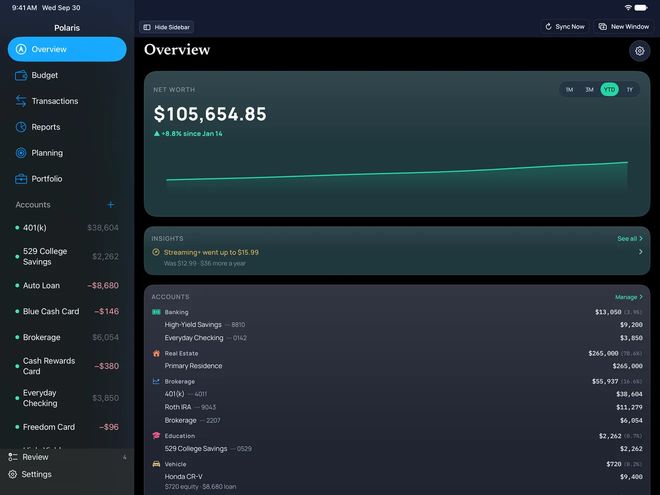
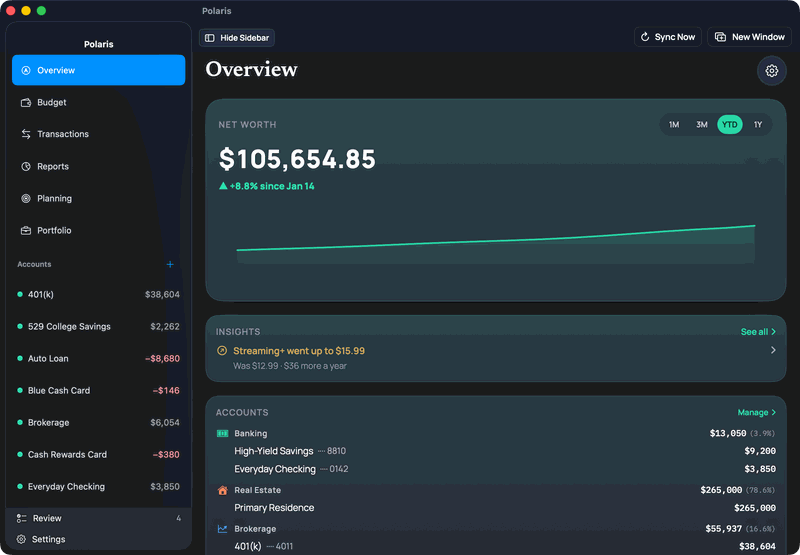
Overview on iPhone: net worth $105,654.85, and an insight that Streaming+ went up to $15.99, $36 more a year.Polaris on iPad showing the same Overview, with the sidebar open.Polaris on Mac showing the Overview: net worth of $105,654.85 with a year-to-date chart, an insight that Streaming+ went up to $15.99, and the accounts listed in the sidebar and in the Accounts card.
One budget on your iPhone, iPad and Mac, synced through your iCloud.

Budget with Envelopes or Tracking.

Assign money to envelopes, then spend. Or set targets, then watch spending. Switch any time. Same accounts, same categories.

Budget on iPhone in Envelopes style: $1,232.49 Ready to Assign at the top, then each category with what is assigned and what is available.
Ready to Assign is the cash you still have to assign.
Budget on iPhone in Tracking style: $2,205 spent this month against a $3,055 target, then each category against its own target.
A target for each category. Nothing to assign.
Target for Vacation, Flights, set by a date: $1,200 in total, ready by June 2027. $80 is assigned this month. To have $1,200 ready by June 2027, you’d need to assign about $120 a month. 10 months to go.
Ready to Assign is $1,192.49. Today it fell $40.00 because $40.00 was assigned to Flights.September 2026 budget. Credit Card Payments available is $1,718: Sapphire Card $1,140, Cash Rewards Card $380, Blue Cash Card $146, and Hotel Rewards Card $52.Move Money from Set Aside, $250.00, to Ready to Assign, $1,232.49, with Move all $250.00.
Target for Vacation, Flights, set by a date: $1,200 in total, ready by June 2027. $80 is assigned this month. To have $1,200 ready by June 2027, you’d need to assign about $120 a month. 10 months to go.

Targets

A target can be every month, every year, build up to an amount, or by a date. The ring fills as you assign, and shows a check when this month’s share is funded.

Cover overspending

When a category runs short, Balance ranks the ways to cover it.

Ready to Assign is $1,192.49. Today it fell $40.00 because $40.00 was assigned to Flights.

Why a number changed

When Ready to Assign moves, open it to see the named causes (a statement posted, spending, a refund, an assignment) that add up to the change.

September 2026 budget. Credit Card Payments available is $1,718: Sapphire Card $1,140, Cash Rewards Card $380, Blue Cash Card $146, and Hotel Rewards Card $52.

Card payment envelopes

One envelope for each card. For a card you pay in full, it holds everything you owe on it, not only the last statement.

Move Money from Set Aside, $250.00, to Ready to Assign, $1,232.49, with Move all $250.00.

Set Aside

Set Aside for next month: park spare money for the month it’s for. When that month comes, release it to Ready to Assign with one tap.

Captions and transcript included.
Read the narration
  1. Your pay lands in checking. One pile of money, no direction on it yet.
  2. So you chart the month. Assign your money to what it has to cover. Nothing leaves your account — you're deciding where it's headed.
  3. Then life happens. As you spend, Available goes down, so you always know what's still yours to spend.
  4. Plans change. If one category runs short, move money from one with room to spare. Nothing extra is spent.
  5. Or borrow from an obligation. Pay less on the card now, and Polaris shows what that costs later.
  6. Some bills come once a year. Set a target, and Polaris spreads it out, so December is a payment, not a shock.
  7. Polaris keeps looking for slack, and points it at the goal you actually care about.
  8. Every financial goal starts with a budget. Polaris Budget keeps you on course.

Assign

Pay hits checking. You assign it to categories. Money never leaves the bank. You’re only deciding where it goes.

Spend

Available falls as charges arrive, pending ones included. A deposit joins Ready to Assign once it posts.

Move

Short in one category? Cover it from another, or see what carrying a card would cost in interest.

Aim

Annual bills get targets, so a yearly bill becomes a monthly amount.

Your budget never leaves your devices and your iCloud.

The way other budget apps work

Account
You create an account.
Your data
Your transactions and budget are usually stored on the app’s servers.
Insights
Insights may be written off your phone, on a server.

A server copy is something that always has to be guarded.

The Polaris way

Account
No Polaris account, so Polaris doesn’t know who you are.
Your data
Your budget never leaves your devices and your iCloud. Your transactions live there too, with no copy on Polaris servers.
Insights
Written insights run on your device with Apple Intelligence.¹

¹ iPhone 15 Pro, iPhone 15 Pro Max, iPhone 16 models or later, or iPhone Air; iPad mini (A17 Pro) or iPad models with M1 or later; or MacBook Neo or a Mac with M1 or later. On iOS 26, iPadOS 26 or macOS 26 or later, with Apple Intelligence turned on in a supported language. Everything else in Polaris Budget works without it.

“The way other budget apps work” describes common practice. It is not a statement about any one app.

A few things do leave your devices. Every one is listed.

See what leaves your devices

What does leave your devices

  • Bank syncs pass through our server on their way to the app. We don’t keep them. Price lookups send only ticker symbols. We keep the public prices, not who asked.
  • Usage counts, including crash counts. Each request carries random IDs made on your devices. We store them only in scrambled form, with no balances and no transactions. They are deleted 90 days after your last request.
  • A support report, only if you choose to send one, with any screenshots you add. It leaves out dollar amounts unless you turn them on. We keep it for up to 90 days.
  • A note from Suggest a Feature, only if you send one. It goes to our support email.
  • If you link a bank, our connection partner and the network it uses keep that connection and a copy of that bank’s accounts and transactions on their servers, under their own privacy policies.
  • If you share your budget, it reaches your partner’s devices through iCloud, with what you chose for each account: Everything, Balance only, or Nothing.

Bank linking is optional and read-only. Our connection partner Quiltt connects to your bank through networks such as Plaid or Finicity (from Mastercard), which many finance apps use. Quiltt can work with more than one network, which gives us options if a bank’s connection has trouble. Your bank login goes only to them and your bank, never to Polaris.

Insights that point you somewhere.

Transactions on iPhone, last 90 days: 40 found, $5,300 in and $4,185 out, grouped by day.
Tags for the 2026 plan year. FSA Eligible is $46.50 across 2 transactions, with Export claim. Tax Deductible is $0.00.Polaris on iPhone showing the Overview: net worth of $105,654.85, up 8.8% since Jan 14, with an insight that Streaming+ went up from $12.99 to $15.99, $36 more a year.Recurring on iPhone: subscriptions of $36 a month ($438 a year) across 4 charges. Streaming+ is $15.99, up from $12.99, then Tune Music, Blue Bottle Coffee and Cloud Drive. Bills, $1,930 a month, start below.Income & Spending on iPhone with sample data: six months of income above the line and spending below it, by category, with In, Out and Net totals.Polaris on iPhone showing the Overview: net worth of $105,654.85, up 8.8% since Jan 14, with a Streaming+ price-rise insight.
Transactions on iPhone, last 90 days: 40 found, $5,300 in and $4,185 out, grouped by day.

Transactions

Linked transactions usually arrive with a category. A pending charge is marked Pending and counts against its category before it posts. A pending deposit joins Ready to Assign once it posts.

Scan a receipt

Scan a receipt and split the purchase into categories. It does not add a new transaction. The photo is saved on your devices and in your personal iCloud.

Import a .csv file

Bring transactions in from a spreadsheet or another app as a .csv file. The import brings history. It does not bring budgets, targets or assignments.

Tags for the 2026 plan year. FSA Eligible is $46.50 across 2 transactions, with Export claim. Tax Deductible is $0.00.

Tags and claims

Tag a purchase, or just one line of a split, as FSA Eligible or Tax Deductible. Build a PDF or CSV on your device to send with your own claim. Nothing is uploaded until you share it. Not tax advice.

Polaris on iPhone showing the Overview: net worth of $105,654.85, up 8.8% since Jan 14, with an insight that Streaming+ went up from $12.99 to $15.99, $36 more a year.

A price rise

When a subscription’s price goes up, it is flagged for you, with what it costs more a year.

Recurring on iPhone: subscriptions of $36 a month ($438 a year) across 4 charges. Streaming+ is $15.99, up from $12.99, then Tune Music, Blue Bottle Coffee and Cloud Drive. Bills, $1,930 a month, start below.

Recurring

Recurring lists the charges that repeat, split into subscriptions and bills. See what your subscriptions cost a month and a year.

Income & Spending on iPhone with sample data: six months of income above the line and spending below it, by category, with In, Out and Net totals.

Reports

See what came in, what went out and the net over 3, 6 or 12 months, or dates you pick. Pick the categories, and the bars and totals follow.

Polaris on iPhone showing the Overview: net worth of $105,654.85, up 8.8% since Jan 14, with a Streaming+ price-rise insight.

Net worth

Your accounts, your home and your holdings in one number.

Recurring charges and price rises are flagged for you on any iPhone, iPad or Mac. Written insights use Apple Intelligence and need an iPhone, iPad or Mac that supports it.¹

¹ iPhone 15 Pro, iPhone 15 Pro Max, iPhone 16 models or later, or iPhone Air; iPad mini (A17 Pro) or iPad models with M1 or later; or MacBook Neo or a Mac with M1 or later. On iOS 26, iPadOS 26 or macOS 26 or later, with Apple Intelligence turned on in a supported language. Everything else in Polaris Budget works without it.

Know which card to use, and what you left on the table.

Which card to use, before you pay, with Gas selected. Your Freedom Card, ending 6634, earns 5¢ per dollar on Gas with this quarter’s bonus, about 0.5¢ more per dollar than your next-best card, the Sapphire Card.A $51.85 charge at a gas station on the Hotel Rewards Card. A note says you could have saved $1.50 by using your gas card.Overview, net worth $105,654.85, about 10% higher this year. An insight says a $7 streaming credit ends tomorrow on your rewards card, with no matching charge on the card this month.
Which card to use, before you pay, with Gas selected. Your Freedom Card, ending 6634, earns 5¢ per dollar on Gas with this quarter’s bonus, about 0.5¢ more per dollar than your next-best card, the Sapphire Card.

Before you pay: Which Card

Pick what you’re buying, and Polaris names the best card you already have.

Illustrative estimate, not financial, investment, or tax advice.

A $51.85 charge at a gas station on the Hotel Rewards Card. A note says you could have saved $1.50 by using your gas card.

After you pay: the gold mark

A gold mark shows a purchase another card you own would have paid more for, and by how much.

Illustrative estimate, not financial, investment, or tax advice.

Overview, net worth $105,654.85, about 10% higher this year. An insight says a $7 streaming credit ends tomorrow on your rewards card, with no matching charge on the card this month.

Before a credit ends

Overview can flag a card credit that is about to end, with its amount and when it ends, if Polaris hasn’t seen a matching charge on the card.

Illustrative estimate, not financial, investment, or tax advice.

Estimates only. Confirm earn rates with your issuer.

Budget together, on your own devices.

Your partner is included at no extra cost. One subscription covers you both.

Invite your partner. For each account, choose what they see: Everything, Balance only, or Nothing. Each of you uses your own iPhone, iPad or Mac and links your own banks. A private group can stay yours.

Share This Budget on iPhone: One budget, on both partners’ iPhones. The 401(k) is Balance only, and the Blue Cash Card is Nothing.

Share a budget

Invite your partner. They edit the same budget from their own iPhone, iPad or Mac. Your partner is included at no extra cost. One subscription covers you both.

Choose what your partner sees

For each account, choose what your partner sees: Everything, Balance only, or Nothing. Each of you links your own banks, and neither of you sees the other’s logins.

How to invite your partner

Add your partner to the long view.

You share one budget. Once your partner joins, you can add their age and take-home pay to the retirement plan. It is off until you turn it on. The chart marks the age they stop earning.

Illustrative estimate, not financial, investment, or tax advice.

Sam stops earning.Sample names

The long view.

Portfolio on iPhone: total value of $58,198.80, your return up 9.8%, charted beside the S&P 500 and a 60/40 blend.Planning on iPhone: a retirement chart marked Sam, with 83% of simulated paths still having money at age 90.Auto Loan, $8,680.00 owed, debt-free November 2028, 2 years left, $587 interest left, 5.9% APR, payment $357 a month.
Portfolio on iPhone: total value of $58,198.80, your return up 9.8%, charted beside the S&P 500 and a 60/40 blend.

Portfolio

Your return beside the S&P 500 and a 60/40 blend, with estimated dividends.

Illustrative estimate, not financial, investment, or tax advice.

Planning on iPhone: a retirement chart marked Sam, with 83% of simulated paths still having money at age 90.

Planning

A retirement outlook built from your own accounts, from 1,000 simulated market paths.

Illustrative estimate, not financial, investment, or tax advice.

Auto Loan, $8,680.00 owed, debt-free November 2028, 2 years left, $587 interest left, 5.9% APR, payment $357 a month.

Debt payoff

Debt payoff: see a projected debt-free date for each card and loan, and how paying more moves it sooner.

An estimate from your balance, rate and payment, not advice.

Illustrative estimate, not financial, investment, or tax advice.

One subscription. iPhone, iPad and Mac.

One subscription covers Polaris Budget on iPhone, iPad and Mac. Your partner is included at no extra cost.

Pricing

Try it free for 2 weeks, then $9.99/month or $79.99/year. Billed by Apple. Cancel anytime in Settings. Your partner is included at no extra cost. One subscription covers you both.

You need a subscription to link a bank or add your own accounts.

US pricing. Prices may vary by region.

Download on the App Store

Questions

Do I need an account?
No. There is no Polaris account to create.
Where does my data live?

Your budget never leaves your devices and your iCloud. Your transactions live there too.

No copy on Polaris servers. No Polaris account.

Bank linking is optional and read-only. Our connection partner Quiltt connects to your bank through networks such as Plaid or Finicity (from Mastercard), which many finance apps use. Quiltt can work with more than one network, which gives us options if a bank’s connection has trouble. Your bank login goes only to them and your bank, never to Polaris.

What does leave your devices

  • Bank syncs pass through our server on their way to the app. We don’t keep them. Price lookups send only ticker symbols. We keep the public prices, not who asked.
  • Usage counts, including crash counts. Each request carries random IDs made on your devices. We store them only in scrambled form, with no balances and no transactions. They are deleted 90 days after your last request.
  • A support report, only if you choose to send one, with any screenshots you add. It leaves out dollar amounts unless you turn them on. We keep it for up to 90 days.
  • A note from Suggest a Feature, only if you send one. It goes to our support email.
  • If you link a bank, our connection partner and the network it uses keep that connection and a copy of that bank’s accounts and transactions on their servers, under their own privacy policies.
  • If you share your budget, it reaches your partner’s devices through iCloud, with what you chose for each account: Everything, Balance only, or Nothing.

Privacy Policy

Which banks work?
Linking is optional and read-only. Banks that are having trouble are listed on Connection status. You can add an account by hand, or import a .csv file.
How does a partner join?
In Settings, tap Shared Budget, then Share this budget. Your partner gets the invite by Messages or Mail and joins from their own iPhone, iPad or Mac. One subscription covers both of you. For each account you choose Everything, Balance only, or Nothing.
What does the subscription cover?
Linking a bank and adding your own accounts. $9.99/month or $79.99/year. US pricing, billed by Apple. One subscription covers two people. You can explore with sample data without subscribing. One subscription covers Polaris Budget on iPhone, iPad and Mac.
How does the 2-week trial work?
New subscribers can try Polaris Budget free for 2 weeks.* Unless you cancel at least 24 hours before the trial ends, Apple charges you for the plan you chose, at the price shown at purchase, and the plan renews until you cancel. Plans are $9.99/month or $79.99/year, billed by Apple.
What happens if I stop subscribing?
If your subscription ends, a budget with linked bank accounts opens one more time, then locks until you subscribe again. After it locks, your linked banks are disconnected, and you link them again when you come back. Nothing in your budget is deleted. A budget with only manual accounts stays open, but adding an account needs a subscription. A partner on your budget keeps access for up to 30 days after yours ends.
Is this financial advice?
No. Portfolio, retirement, debt payoff and card rewards are illustrative estimates, not financial, investment, or tax advice.

*Trial eligibility is determined by Apple.

Set your targets. Polaris keeps you pointed at them.

Download on the App Store

What does leave your devices

  • Bank syncs pass through our server on their way to the app. We don’t keep them. Price lookups send only ticker symbols. We keep the public prices, not who asked.
  • Usage counts, including crash counts. Each request carries random IDs made on your devices. We store them only in scrambled form, with no balances and no transactions. They are deleted 90 days after your last request.
  • A support report, only if you choose to send one, with any screenshots you add. It leaves out dollar amounts unless you turn them on. We keep it for up to 90 days.
  • A note from Suggest a Feature, only if you send one. It goes to our support email.
  • If you link a bank, our connection partner and the network it uses keep that connection and a copy of that bank’s accounts and transactions on their servers, under their own privacy policies.
  • If you share your budget, it reaches your partner’s devices through iCloud, with what you chose for each account: Everything, Balance only, or Nothing.

Bank linking is optional and read-only. Our connection partner Quiltt connects to your bank through networks such as Plaid or Finicity (from Mastercard), which many finance apps use. Quiltt can work with more than one network, which gives us options if a bank’s connection has trouble. Your bank login goes only to them and your bank, never to Polaris.